
How to Use the VeerGame Referral Program
This page is the Agency menu walkthrough: where the invite code is, what the dashboard numbers mean, and how commission is paid. The earning tables live on the Refer & Earn Program and Daily Salary System guides. Use this one when the question is 'which button do I tap', not 'what is the top tier'.
Finding your invite code and link
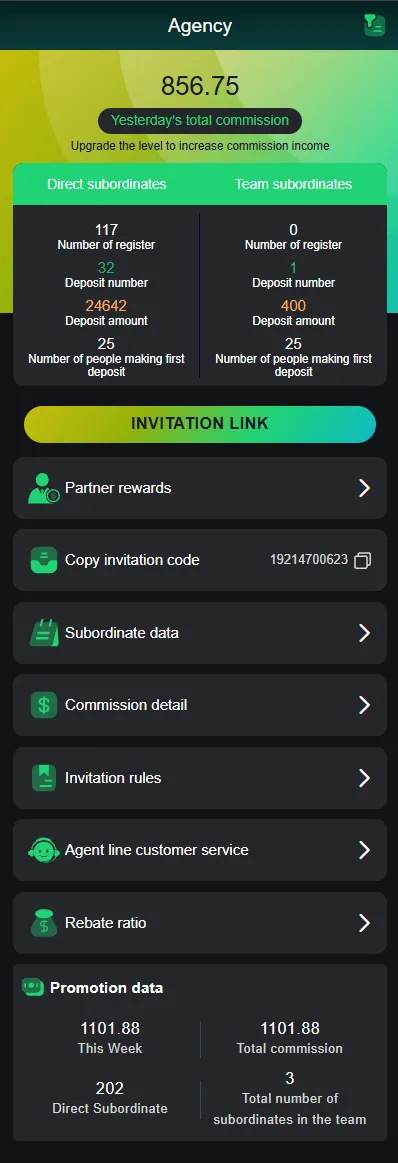
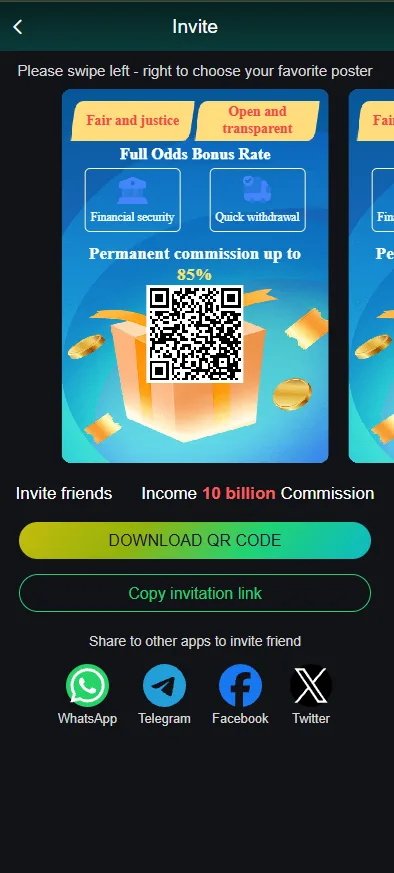
Open Promotion, then Agency, then Copy invitation code. The same area offers a sharing poster on the screens we documented. That code is what registration will store as your referral. There is no later screen to attach a referrer to an account that already exists, which is why the Register Guide treats the invite field as a one-time decision.
If Copy invitation code is missing, you are not on the Agency page — Partner rewards, Invitation rules and Rebate ratio are siblings in the same menu, not the copy control.
Sharing your invite link or code
Share it where you already talk to people — a message, a social post, or this site's Telegram channel if you use it. Say that it is a referral link. People who feel tricked into an invite code are how complaints and fake-account reviews start.
Do not promise a salary, a guaranteed bonus, or that the welcome bonus 'requires' your code. The welcome bonus is a first-deposit offer; your code attaches them to your downline. Those are different products.
What happens when someone signs up with your code
They become your level-1 downline. Their later invites can sit deeper in your team, as the six-level tree on Refer & Earn explains. Nothing pays at the moment of registration unless a live event says otherwise — deposits and verification are what move the tables.
Direct subordinates on the dashboard should tick up by one registered person. If that number does not move, they did not use your code, or they have not finished registration.
Reading your Agency dashboard
The Agency screen we documented splits Direct subordinates from Team subordinates. Each side shows number of register, deposit number, deposit amount, and number of people making a first deposit. Direct is your codes. Team is the wider tree. First-deposit count is the one that feeds several bonus rules; a long register list with a zero first-deposit count is a list, not earnings.
Yesterday's total commission is the honest daily check. A prompt to upgrade the level to increase commission income is pointing at L0–L10 rebate, not at a button that raises pay by itself. This Week, Total commission and Total subordinates are totals — read the labels before screenshotting a number as 'what I made today'.
Tracking your invites and earnings further
The same Agency menu lists Partner rewards, Subordinate data, Commission detail, Invitation rules, Agent line customer service, and Rebate ratio. Invitation rules is the terms screen. Commission detail is the ledger. Rebate ratio is the per-game percentage that goes with your agency level. Agent line customer service is the operator's channel for agency questions — not this guide site.
Use Commission detail when yesterday's total looks wrong. Use Invitation rules when a banner disagrees with a payout. Do not send passwords or OTPs to anyone in that chat.
Getting paid
Daily commission is calculated at 1:00 AM for the previous day's activity and credited to the wallet, viewable in the Commission Record. That is the Refer & Earn clock. Event rewards on the invitation-rules screen were separately described as crediting within about ten minutes of approval.
A credit in the wallet is still subject to the platform's withdrawal rules: active bets at ₹0, a saved payout method, and the daily window. Commission is not a parallel cash-out path.
Do's and don'ts
- Do say it is a referral link.
- Do send people to the Register Guide and Responsible Gaming page rather than to a promise.
- Don't promise guaranteed earnings, a salary, or that losses will be refunded.
- Don't create extra accounts, shared bank details, or fake deposits to move a tier.
- Don't ask anyone for their password, OTP or bank OTP — and don't give yours to an 'agent'.
Want the full earning tiers?
Invite-count and recharge tables are on the Refer & Earn Program page. The verified team-deposit salary table is on the Daily Salary System guide. This page stays the how-to so those two do not have to repeat the Agency menu.
Frequently asked questions
Where do I find my VeerGame invite code?
How do I share my invite link?
How do I track how much I've earned?
Is using the referral program free?
Related guides
- Refer & Earn Program
VeerGame Refer & Earn Program
- Telegram Channel
VeerGame Updates & Gift Codes: Join Our Telegram Channel
- Register Guide
How to Register on VeerGame: Step-by-Step