
How to Deposit on VeerGame: UPI & USDT Guide
Deposit into your Veer Game app wallet with UPI, Paytm or USDT. Independent steps after Veer Game login, including amount-match troubleshooting.
Deposit methods available
The deposit screen groups several channels, most of them variations on UPI. UPI-QR is the default route: the app generates a QR code and you pay it from any UPI app. Innate UPI-QR and Expert UPI-QR are alternative UPI processors that behave the same way from your side — if one is unavailable or failing, another is worth trying.
Paytm is offered for players who prefer paying from a Paytm balance or account. USDT covers stablecoin deposits for anyone funding from crypto rather than a bank, and ARPay appears as a further payment processor option on the same screen.
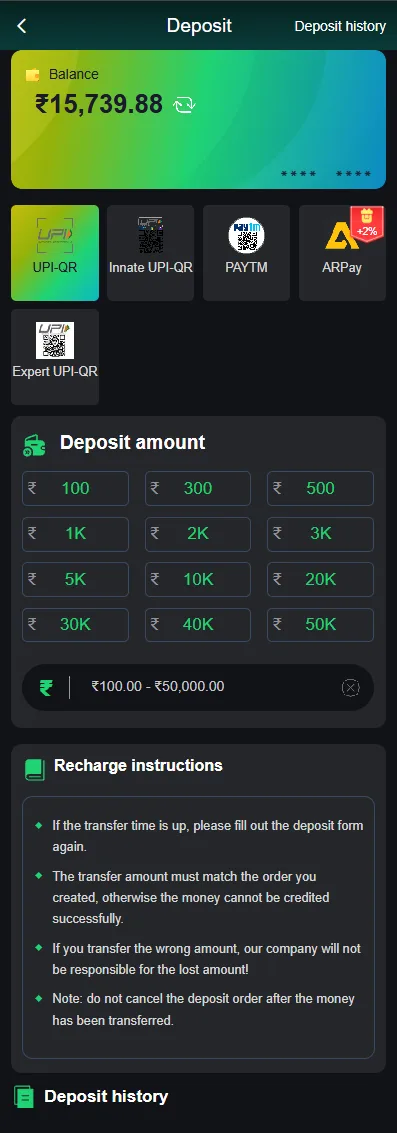
Step-by-step deposit
A deposit is a two-part transaction: the app creates an order, and you pay that order exactly. Treat the amount as fixed once generated.
- Tap the Wallet icon from the home screen.
- Tap Deposit to open the method list.
- Choose a method — UPI-QR, Paytm, USDT or another listed option.
- Select a channel within that method if more than one is offered.
- Enter the amount you intend to deposit.
- Tap Deposit, then complete payment by scanning the QR code or barcode the app displays, transferring exactly the amount shown.
Once paid, return to the app and wait for confirmation rather than starting a second deposit. A successful payment is normally credited automatically without any further action.
Rules that prevent failed deposits
The amount you transfer must match the generated order exactly. This is the rule that causes most deposits to go missing: matching is how the system reconciles an incoming payment against your account, so a different figure leaves the payment unattached even though the money has left your bank.
Say the app generates an order for ₹500. Paying ₹500 is credited automatically. Paying ₹499 or ₹501 — whether from rounding, a manually typed figure or a payment app adding a charge — will not match, and that deposit needs manual intervention from support with the order number before it can be resolved.
Payment orders also expire. If the timer runs out before you pay, do not pay against the old QR code — go back and create the deposit again, because the expired order is no longer waiting for the money. And after a successful payment, resist resubmitting the form while you wait: duplicate orders are a common way to end up having paid twice.
Choosing UPI vs. USDT vs. Paytm
For most players in India, UPI is the path of least resistance — instant, familiar and already installed. The others solve specific problems rather than being general upgrades.
| Method | Speed | Best suited to |
|---|---|---|
| UPI-QR | Near-instant when the amount matches | Most players; the default choice with a bank account and any UPI app. |
| Paytm | Near-instant | Players already holding a Paytm balance they would rather spend from. |
| USDT / ARPay | Depends on network confirmation | Players funding from crypto, or where card and bank routes are unavailable. |
If one UPI channel repeatedly fails, switching to another UPI variant on the same screen is usually quicker than escalating — these are different processors behind the same interface.
If a deposit doesn't reflect
Work through this in order before contacting anyone. Most unreflected deposits are explained by the first item on the list.
- Confirm the amount you actually transferred matches the order exactly, checking your bank or UPI app rather than relying on memory.
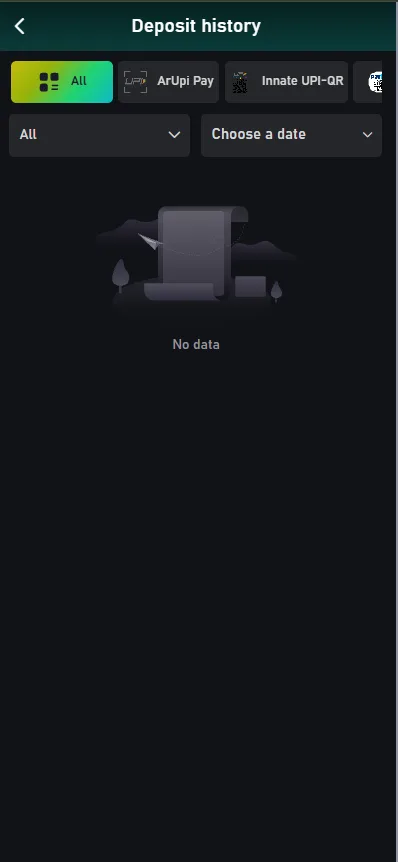
- Open the deposit history screen to see whether the order is recorded as pending, failed or completed.
- Give it the stated processing time. A matched payment is usually near-instant, but network delays happen.
- If it is still missing, contact the platform's Customer Service with the order number and your payment reference.
Do not pay the order a second time hoping to force it through, and do not accept help from anyone who contacts you privately offering to recover it for a fee. As an independent guide we cannot see or release deposits — only the operator can.
How deposits unlock bonuses
Deposits are the trigger for the largest new-player reward on the platform: the welcome bonus, worth up to ₹488, attaches to your first deposit. Because it is tied to the first one specifically, the terms are worth reading before you fund the account rather than afterwards.
Deposits also feed the referral machinery — recharge tiers pay a referrer between ₹38 and ₹388 depending on what an invited player deposits, and team deposit totals drive the daily salary system. Whatever the bonus, you can check whether it has actually landed on the Bonus details screen, which sorts entries into To be collected, Received and Expired.
Read next: Withdrawal Guide and FAQ — they pick up where this page leaves off.
Frequently asked questions
What's the minimum deposit on VeerGame?
Can I deposit with USDT?
My deposit isn't showing in my balance — why?
How long does a deposit take to reflect?
Related guides
- Welcome Bonus Guide
VeerGame Welcome Bonus: Up to ₹488 Explained
- Withdrawal Guide
How to Withdraw From VeerGame
- FAQ
Frequently Asked Questions About VeerGame