
How to Reset Your VeerGame Password
Veer Game login password reset: recover access with your registered phone and OTP. Independent Veer Game forgot-password steps.
Why this happens
Forgetting a password is routine, especially on an account you log into from a phone that usually remembers it for you. Nothing is lost when it happens — your balance, bonus history and referral data all stay exactly where they are.
The reset runs entirely from the login screen and takes a couple of minutes, because the platform verifies you with an OTP sent to your registered phone number rather than an email round-trip.
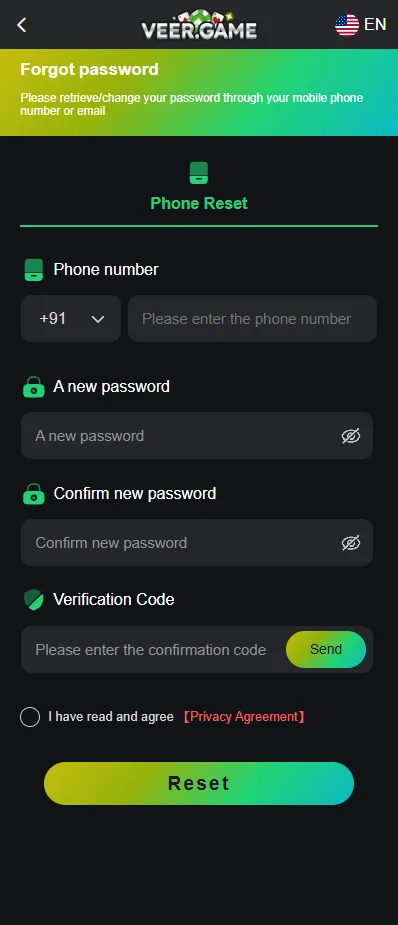
Step-by-step password reset
Have your registered phone to hand before you start, since the OTP arrives by SMS and most codes expire quickly.
- Tap the Account icon to reach the account options.
- Tap Forgot Password to open the reset form.
- Enter your registered phone number, checking the country code matches the one you signed up with.
- Enter a new password and confirm it in the second field.
- Tap Send to have an OTP sent to that number.
- Enter the OTP from the SMS, taking care not to transpose digits.
- Tick the box to agree to the Privacy Agreement.
- Tap Reset, then log in with the new password.
Note that the new password is entered before the OTP arrives, so decide what you want it to be up front rather than improvising once the code is on screen and the clock is running.
Password requirements reminder
The new password has to clear the same bar as the original: at least eight characters containing upper-case letters, lower-case letters and numbers. All three character types must be present.
| Example | Result | Why |
|---|---|---|
| password | Rejected | No upper-case letters and no numbers. |
| Password | Rejected | Still no numbers. |
| Veer99 | Rejected | Only six characters. |
| Veergame7 | Accepted | Nine characters with upper, lower and a digit. |
| Kp4mXt9qLz | Accepted | Meets every rule and is far harder to guess. |
Do not reuse the password you just lost, and do not reuse one from another site. A reset is a good moment to move the account into a password manager so the next lockout does not happen.
If the OTP doesn't arrive
A missing OTP is almost always a delivery problem rather than an account problem. Work through these in order.
- Check the number you entered digit by digit, including the country code, which defaults to +91.
- Confirm the phone has signal and is not in airplane mode — SMS will not arrive over Wi-Fi alone.
- Wait a full minute before requesting another code. Rapid resends sometimes invalidate the first message.
- Check whether DND or an SMS-blocking app is filtering messages from unknown senders, and look in any spam or blocked folder your messaging app keeps.
- Try again a few minutes later, since carrier-side delays do happen at busy times.
If no code arrives after several attempts, the number on the account may not be the one you are holding. That is an account-specific problem only the platform's Customer Service can resolve.
Good password hygiene
Change the password periodically, which the platform's own User Agreement guidance on account security also recommends, and change it immediately if you suspect anyone else has seen it or you have entered it on a site you later doubted.
Keep it unique to this account. Reused passwords mean a breach anywhere else becomes a problem here, and an account holding a real balance is worth attacking.
Read next: Login Guide and Register Guide — they pick up where this page leaves off.
Frequently asked questions
How do I reset my VeerGame password?
What if I don't receive the OTP?
How often should I change my VeerGame password?
Related guides
- Login Guide
How to Log In to VeerGame
- Register Guide
How to Register on VeerGame: Step-by-Step